Row 17:导出数据没有根据当前模块类型过滤,导出了所有类型的全部数据
严重
已关闭 · 复测通过
全部类型
模块:项目信息填报 处理人:周小龙
1基本信息
| 问题描述 | 导出数据没有根据当前模块的类型导出,任何类型的导出都是导出的所有类型的所有数据。 |
| 所属模块 | 项目信息填报 / - |
| 严重程度 | 严重(阻断流程:是) |
| 涉及类型 | 全部类型 |
| 提出人 | 文日明 |
| 处理人 / 状态 | 周小龙 / 5.1.已关闭(复测通过) |
2问题截图
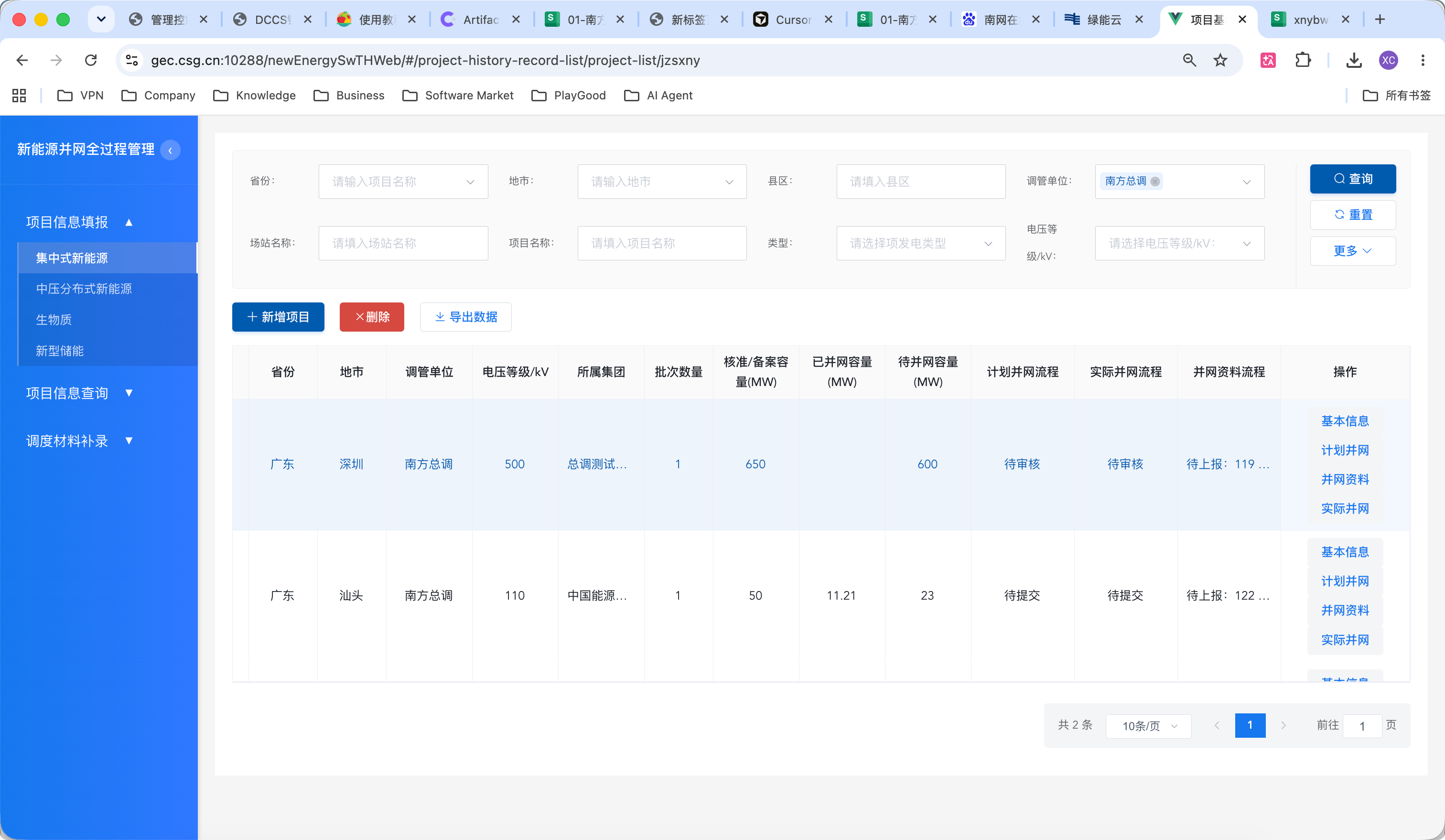
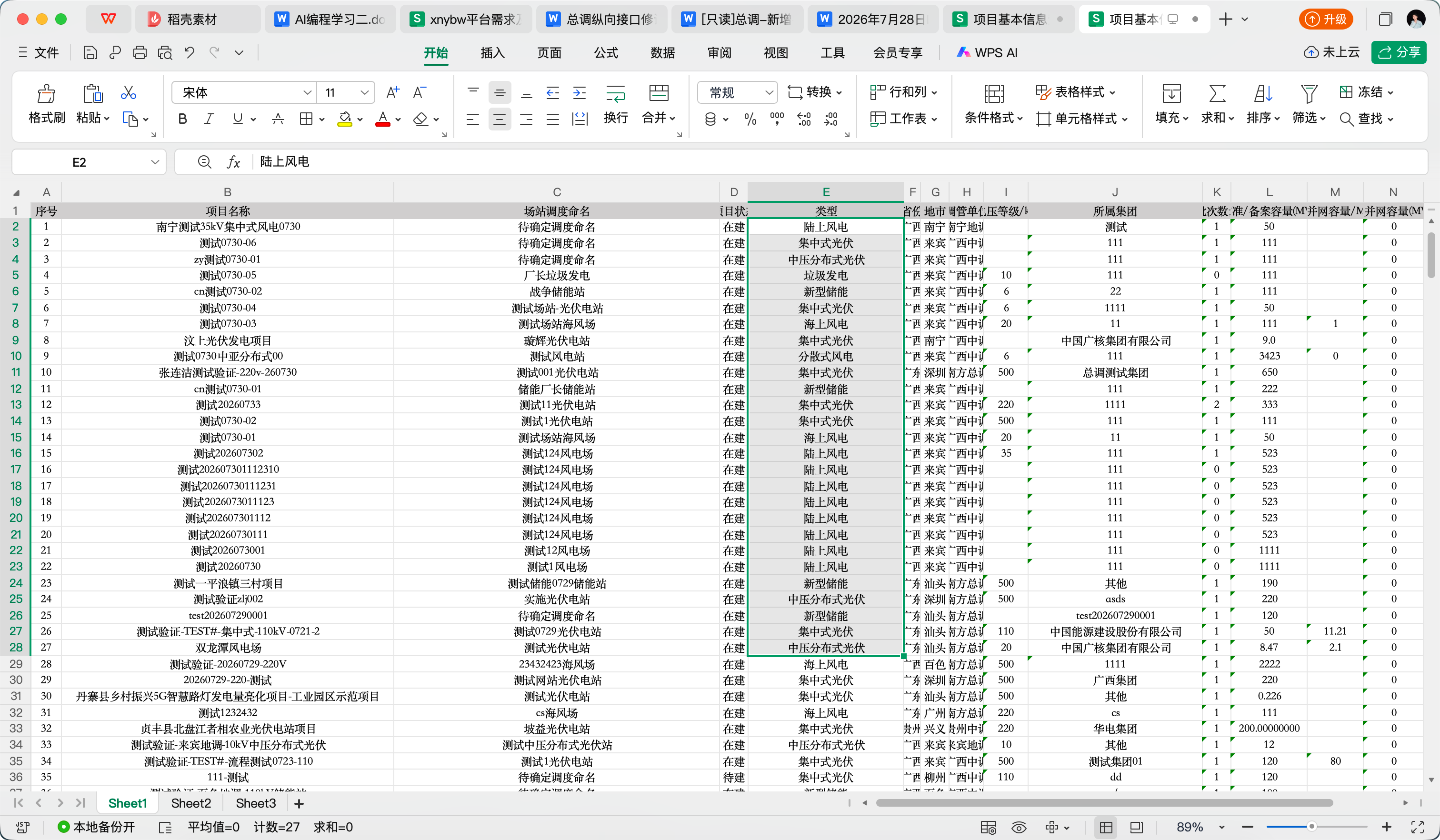
3旧代码定位(backup730 分支)
src/views/projectNew/projectNewList.vue 第 434-460 行 handleExport():
handleExport() {
  const msg = this.selectedData.length < 1 ? '是否导出所有数据至Excel' : '是否导出勾选的' + this.selectedData.length + '条数据至Excel'
  this.exportLoading = true
  this.$confirm(msg, '提示', {...}).then(() => {
    const idArr = []
    this.selectedData.forEach(item => {
      idArr.push(item.planId)
    })
    projectBaseApi.exportProject({
      planIdList: idArr          // 只传了勾选行的 planId 列表,
                                  // 没有传当前页面的 this.type(集中式新能源/新型储能/生物质等)
    }).then(res => {
      ...
      this.createAloadTag(res.data ? res.data : res, '项目基本信息填报导出.xlsx')
    })
  })
}
页面进入时 this.type 其实是明确知道的(由路由 /project-list/:type 传入,见 src/router/modules/base.js 第1-8行),但 handleExport 完全没有使用它:
{
  path: '/project-list/:type',
  name: 'ProjectList',
  props: true,
  component: () => import('@/views/projectNew/projectNewList.vue'),
}
根因说明:导出参数中只带了"勾选行的 planId 列表"(
idArr),当用户未勾选任何行、直接点"导出数据"时(弹窗文案也印证了这一分支:"是否导出所有数据至Excel"),idArr 是空数组,请求体里既没有 planId 过滤条件也没有类型过滤条件,后端 exportProject 接口在两个条件都为空的情况下自然是"来者不拒",导出全库所有类型的数据。即便用户勾选了当前页面可见的几行,导出请求也只锁定这几个 planId,不会以"当前模块类型"为过滤维度,一旦后端对空 planIdList 做了全表兜底查询,就会出现截图中的现象。4修复方案
修复文件:src/views/projectNew/projectNewList.vue(原第 434-450 行)
handleExport() {
  const msg = this.selectedData.length < 1 ? '是否导出所有数据至Excel' : '是否导出勾选的' + this.selectedData.length + '条数据至Excel'
  this.exportLoading = true
  this.$confirm(msg, '提示', {...}).then(() => {
    const idArr = []
    this.selectedData.forEach(item => {
      idArr.push(item.planId)
    })
    projectBaseApi.exportProject({
      planIdList: idArr,
      type: this.type,                     // 新增:把当前页面的项目类型一并传给后端
      types: ListDataUtils.getTypesTextByType(this.type)  // 与列表查询保持同一套"类型→细分类型"映射
    }).then(res => {
      ...
    })
  })
}
后端 ProjectImplAppService#exportProject(导出接口)需要相应地在 SQL / 查询条件中加入按 types 过滤:无论 planIdList 是否为空,都必须以当前模块类型作为查询的强制前置条件,避免"未勾选 = 全表导出"的隐患。
效果:无论用户是否勾选具体行,导出接口都会以"当前模块类型"为边界条件查询,从根本上避免跨类型/跨模块数据泄漏到导出文件中。